Dental appointment booking software for small practices Patients choose their treatment, dentist and appointment online, without making a phone call. DentHello also books the chair, then sends a confirmation and a reminder by email. No credit card required. Cancel your subscription at any time.From €19/month excl. VAT During appointments In a small practice, the same team has to handle both treatment and bookings. Hiring a dedicated receptionist for this rarely pays off, and software built for large clinics usually means booking a sales demo first. During treatment, neither the dentist nor the assistant can answer the phone. Missed calls have to be returned, and until then, it is uncertain whether they will result in a booking. If a patient forgets their appointment or does not let you know they will not attend, the time reserved for treatment is lost. It is too late to fill the empty chair. The practice has to find a new patient for a cancelled appointment, and rescheduling takes several phone calls. Six-month check-ups require keeping a list and contacting patients one by one. DentHello takes over booking, reminders and cancellations – and, with the Pro plan, the waiting list and recall reminders too. Up and running in three steps Step 1 After registering, you enter your practice details and working hours in a short setup wizard, then add treatments and their durations, dentists and chairs. Step 2 You can send patients a link to the booking page or add it to your practice website as a booking button. The patient selects the treatment, dentist and appointment time without having to register, and DentHello books the chair. Step 3 It emails a confirmation and, before the appointment, a reminder with an “I’ll be there” button. If the patient cancels or reschedules the appointment, they do so through their own link, and you receive a notification. With the Pro plan, a freed-up slot is offered to the waiting list. Designed for dental practices Every booking reserves the treatment time, the dentist and the chair at the same time – and the assistant, if the treatment requires one. Daily and weekly views by dentist and chair; working hours and leave can be set for each dentist, and double bookings are prevented. It is easy to use on a phone, and you can add the booking button code to your existing website. You decide which treatments can be booked online. Patients receive confirmations and reminders by email, in Hungarian or English. You set when the reminder is sent, and patients can confirm their attendance with one click. Patients use their own link to cancel or reschedule appointments; you receive an email about every online booking, rescheduling and cancellation. When a slot frees up, we email up to five suitable patients on the waiting list at once; the first to accept gets it. You can also add someone to the waiting list when they ask by phone. When a check-up is due after a treatment, DentHello emails a booking link in good time to patients who have specifically consented to receiving recall reminders. You can invite colleagues by email and assign them an owner or staff role. Staff can manage the calendar, patients, waiting list, treatments and working hours; only owners have access to practice settings, the subscription, user management and data export. The practice interface is available in Hungarian and English; an invoice is issued for every payment. Coming soonSMS and WhatsApp reminders · AI telephone receptionist AI assistant Patients can ask questions in writing on the booking page while you are seeing patients. The AI assistant responds in the patient’s language, based on the information provided by the practice; it leaves clinical questions to the practice. The AI assistant is included in the Pro plan and is switched off by default: you switch it on. The patient gives consent before their first message; without it, nothing is sent to the AI. We store conversations in encrypted form and delete them after 30 days; they are not shown in the practice interface. Data protection facts DentHello does not maintain medical records, but treats booking details – the patient’s name, contact details, appointment time and treatment name – as health data. If you enable the AI assistant, chats are also processed by Anthropic Ireland as an additional data processor. Processing may take place outside the EU; transfers are covered by the European Commission’s Standard Contractual Clauses (SCCs). Pricing Pro includes all Start features, plus the waiting list, recall invitations and the AI assistant. For one dentist who only needs online booking and reminders. €19/monthexcl. VAT For multiple dentists, to fill cancelled appointments. €49/monthexcl. VAT An AI telephone receptionist for dental practices. 30-day trial with all features, no credit card required; there is no charge unless you choose a plan. If you choose the Start plan after the trial, the Pro features are switched off. Monthly payment by credit card, with an invoice for every payment. Cancel at any time and use your plan until the end of the paid month. Frequently asked questions No. DentHello works in a browser, on both computers and phones; patients do not need to download an app either. No. DentHello manages bookings and patients’ contact details but keeps no clinical records, so you use it alongside your practice management software and any statutory e-health reporting, not instead of them. You or a colleague enter the appointment in the DentHello calendar. The chair and dentist are then reserved in the same way, double bookings cannot happen, and if the patient has an email address, they also receive the confirmation and reminder. There is no automatic import at present. You can add appointments you have already arranged to the calendar, and patients book new ones themselves. They do not need to register. They choose the treatment, dentist and time, enter their name, email address and phone number, and confirm that they have read the practice’s privacy notice. By email, 24 hours before the appointment by default; you can change this. From the reminder, patients can confirm that they will attend, or cancel or reschedule through their own link. SMS and WhatsApp reminders are coming soon. Yes. It can be used for any type of appointment and treatment; you set the treatments and their durations. DentHello does not report to health insurers and does not handle claims or other insurance billing data. Copy the booking button code from the settings and paste it into your practice website; the button opens the booking page in a new tab. You can also share the booking page link by email or on social media. No. The 30-day trial is free; you only need to pay if you choose a plan and enter your card details. If you do not choose a plan, online booking for patients will be paused, but you can still sign in and download your data. 90 days after the trial ends, we will delete the data; we will notify you by email at least 14 days beforehand. At any time, on the Subscription page in the application. You can continue using the plan until the end of the month you have already paid for; there is no pro-rata refund, except in the cases listed in clause 10.2 of the Terms and Conditions. You and the colleagues you invite. DentHello acts as your data processor, under the agreement you enter into when you register. The hosting and email delivery providers – and, when the AI assistant is enabled, Anthropic Ireland – are also data processors; see the full list on the sub-processors page and the details on the data security page. The practice interface is available in Hungarian and English; patients can use the booking page in Hungarian or English, while the AI assistant responds in the patient’s language. Register, add your treatments, dentists and working hours, and your booking page is ready to share with patients. No credit card required. Cancel your subscription at any time.While you treat,
patients book.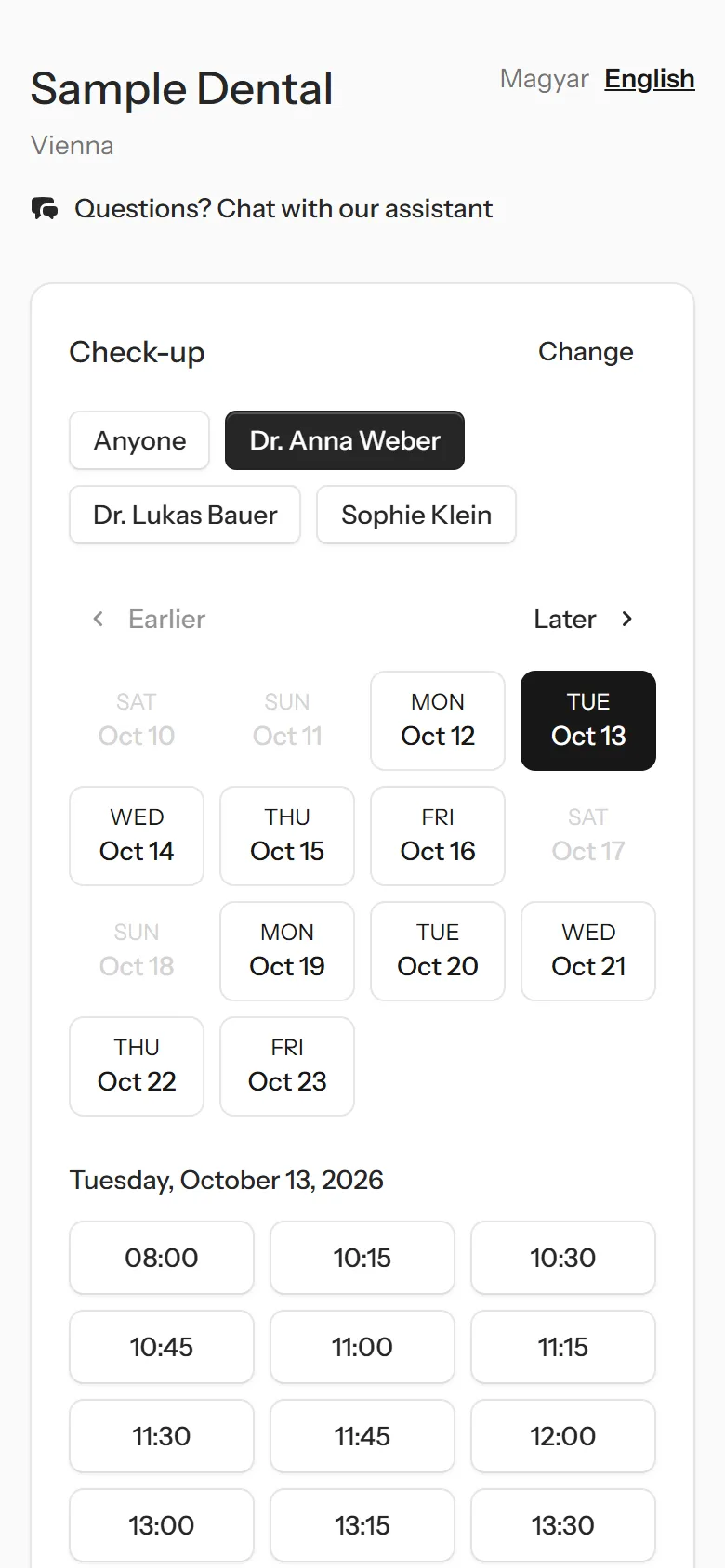
The phone rings, but treatment cannot wait
Missed calls during appointments
A forgotten appointment means an empty chair
Cancellations, rescheduling, check-ups: left until after hours
No demo needed – your booking page is ready in about ten minutes
You set up your practice
Patients book for themselves
DentHello takes it from there
Every booking covers the chair and the team

Dental calendar
Booking page with your practice’s name
Confirmation and “I’ll be there”
Cancel without phoning
Cancelled slots refilled Pro
Recall reminders Pro
Staff access
Two languages, an invoice for every payment
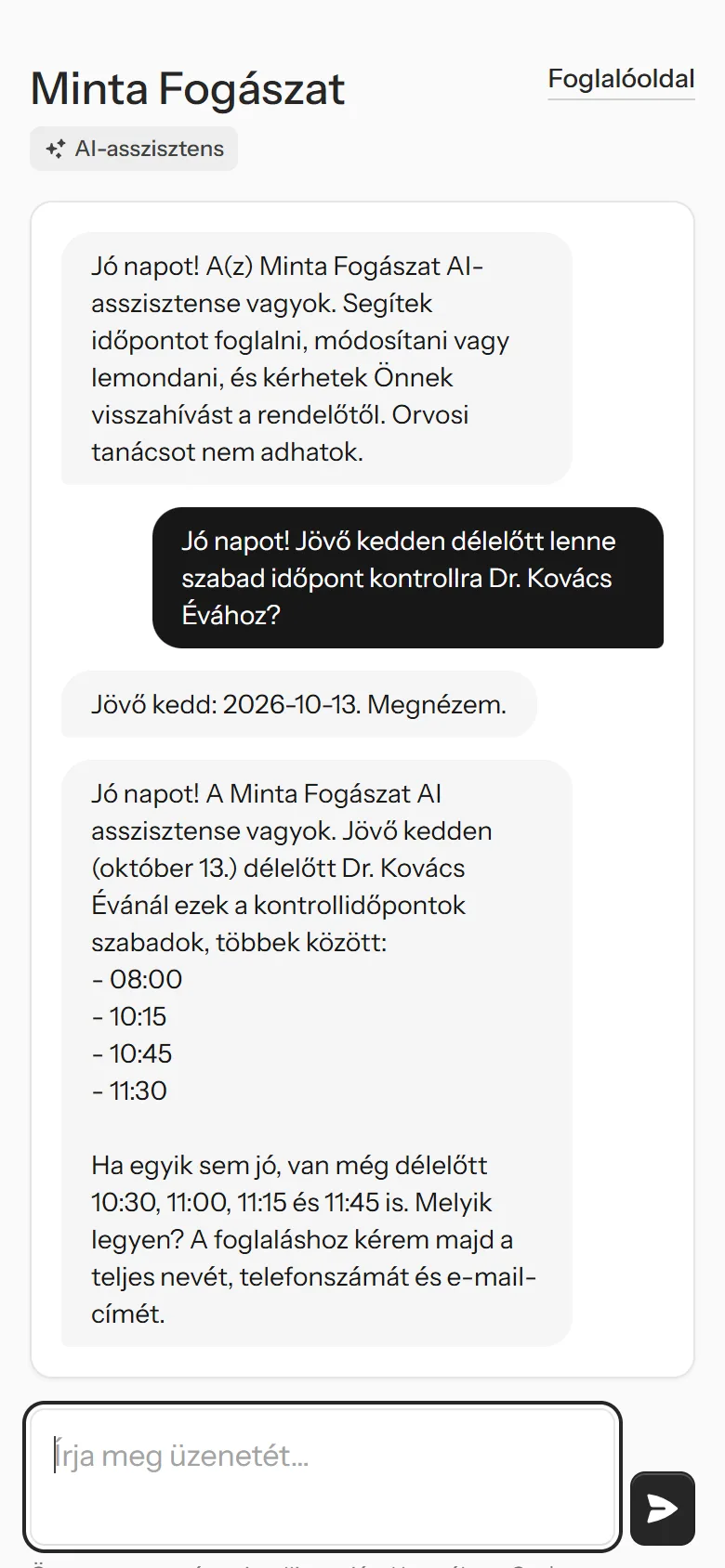
The AI assistant books appointments but does not give medical advice
What it does
What it does not do
You remain the data controller
Two plans: for one dentist or multiple dentists
Start
Try it free for 30 days
Pro
Recommended
Try it free for 30 days
AI receptionist
Coming soon
Before you enable online booking
Do I need to install anything?
Does it replace my practice management software?
What about patients who book by phone?
Can I bring over my existing appointments?
What do patients need to provide?
When and how do patients receive reminders?
Does it work for appointments funded by public health insurance?
How do I add online booking to my website?
Will I be charged automatically after the trial?
How can I cancel my subscription?
Who has access to my patients’ data?
Which languages does it support?
Patients book online – you focus on treatment
Try it free for 30 days
Try it free for 30 days